目录
JS基础
- JavaScript 的一个非常常见的用途是通过文档对象模型 API(如上所述)动态修改 HTML 和 CSS,以更新用户界面
- JavaScript 中并非一切都是对象。
- 每个浏览器标签页就是其自身用来运行代码的独立容器(这些容器用专业术语称为“运行环境”)
- js 运行需要一些基础支持,例如基本的对象,库,函数等,这些在浏览器中是存在的,像 V8 引擎,所以 js 可以直接运行在浏览器上(通常是有浏览器将服务器上的js文件下载下来,然后在浏览器中运行),而要想 js 可以在服务器上运行,就需要有基础环境的支持,而 Node.js 就是发挥这个作用,即所谓的运行环境。
- 可以像添加 CSS 那样将 JavaScript 添加到 HTML 页面中。CSS 使用
<link>元素链接外部样式表,使用<style>元素向 HTML 嵌入内部样式表,而 JavaScript 这里只需一个元素——<script>。
<script>function (){}</script>
<script src="demo.js" defer></script>
-
使用 defer 告诉浏览器在遇到
<script>元素时继续下载 HTML 内容,浏览器遇到 async 脚本时不会阻塞页面渲染,而是直接下载然后运行。但是,一旦下载完成,脚本就会执行,从而阻止页面渲染。脚本的运行次序无法控制。当页面的脚本之间彼此独立,且不依赖于本页面的其他任何脚本时,async 是最理想的选择。 -
使用 defer 属性加载的脚本将按照它们在页面上出现的顺序加载。在页面内容全部加载完毕之前,脚本不会运行,如果脚本依赖于 DOM 的存在(例如,脚本修改了页面上的一个或多个元素),这一点非常有用。
note
js操作的html元素必须先于js脚本加载,否则会发生错误,因为html元素还不存在,无法操纵
-
三种脚本加载方法的工作原理:默认情况下,在获取和执行 JavaScript 时,解析过程被阻塞。使用 async 时,解析暂停,仅执行。使用 defer 时,解析不会暂停,但在解析完所有其他内容后才开始执行
-
脚本调用策略小结:
- async 和 defer 都指示浏览器在一个单独的线程中下载脚本,而页面的其他部分(DOM 等)正在下载,因此在获取过程中页面加载不会被阻塞。
- async 属性的脚本将在下载完成后立即执行。这将阻塞页面,并不保证任何特定的执行顺序。
- 带有 defer 属性的脚本将按照它们的顺序加载,并且只有在所有脚本加载完毕后才会执行。
- 如果脚本无需等待页面解析,且无依赖独立运行,那么应使用 async。
- 如果脚本需要等待页面解析,且依赖于其他脚本,调用这些脚本时应使用 defer,将关联的脚本按所需顺序置于 HTML 的相应
<script>元素中。
-
侦听事件发生的结构称为事件监听器(Event Listener),响应事件触发而运行的代码块被称为事件处理器(Event Handler)。
基础概念
- Number:整型和浮点型
- 整数字面量:
- 十进制整数字面量由一串数字序列组成,且没有前缀 0。
- 八进制的整数以 0(或 0O、0o)开头,只能包括数字 0-7。
- 十六进制整数以 0x(或 0X)开头,可以包含数字(0-9)和字母 a~f 或 A~F。
- 二进制整数以 0b(或 0B)开头,只能包含数字 0 和 1。
- 浮点数字面量组成:
- 一个十进制整数,可以带正负号(即前缀“+”或“-”),
- 小数点(“.”),小数点前不写则表示0,例如:.123
- 小数部分(由一串十进制数表示),
- 指数部分。指数部分以“e”或“E”开头,后跟一个整数,可以有正负号(即前缀“+”或“-”)
- 整数字面量:
- String:字符串,使用单引号或双引号
- Boolean:true 和 false( false 包括
undefined,null,0,NaN,"") - Symbol:是一种原始数据类型,从 Symbol() 返回的 symbol 值都是唯一的。一个 symbol 值能作为对象属性的标识符;这是该数据类型仅有的目的。不支持语法:
new Symbol()。 - Object:对象
- 对象字面量简写:
var obj = {
  // __proto__
  __proto__: theProtoObj,
  // Shorthand for ‘handler: handler’
  handler,
  // Methods
  toString() {
    // Super calls
    return "d " + super.toString();
  },
  // Computed (dynamic) property names
  ["prop_" + (() => 42)()]: 42,
};
- 用
var或let语句声明的变量,如果没有赋初始值,则其值为undefined。undefined的类型是undefined null表示变量不引用任何对象,null的类型是object- RegExp 字面值:/ab+c/
- 全局属性
NaN是一个表示非数字的值。它是全局作用域中的一个变量。- 有五种不同类型的操作返回
NaN:- 失败的数字转换(例如,显式转换,如
parseInt("blabla")、Number(undefined),或隐式转换,如Math.abs(undefined)) - 计算结果不是实数的数学运算(例如,
Math.sqrt(-1)) - 不定式(例如,
0 * Infinity、1 ** Infinity、Infinity / Infinity、Infinity - Infinity) - 一个操作数被强制转换为
NaN的方法或表达式(例如,7 ** NaN、7 * "blabla")——这意味着NaN具有传染性 - 将无效值表示为数字的其他情况(例如,无效的
Date new Date("blabla").getTime()、"".charCodeAt(1))
- 失败的数字转换(例如,显式转换,如
isNaN(x):如果x是NaN,或者将x强转为数字后结果是NaN,返回trueNumberisNaN(x):如果x是NaN,返回true
- 有五种不同类型的操作返回
-
运算符
-
typeof运算符:返回变量类型 -
==:测试值是否相同,但是数据类型可能不同 -
===:测试值和数据类型是否相同 -
模板字面量:反引号声明的字符串,可以在
${}中包装 JavaScript 变量或表达式;模板字符串会保留源代码中的换行符,因此可以编写跨越多行的字符串 -
与或非:
&& || ! -
逻辑空赋值运算符(
x ??= y):仅在x是空值(null或undefined)时对其赋值x = y -
逻辑与赋值(
x &&= y):运算仅在x为真值时为其赋值。 -
逻辑或赋值(
x ||= y):运算仅在x为假值时为其赋值。 -
delete操作符:删除一个对象的属性(不是继承而来的属性)或者一个数组中某一个键值delete objectName.property; delete trees[3]; -
in操作符:如果所指定的属性确实存在于所指定的对象中,则会返回true,propNameOrNumber in objectName; -
instanceof操作符:如果所判别的对象确实是所指定的类型,则返回true,obj instanceof TypeName -
扩展运算符(
...):用于将数组或可迭代对象中的元素展开到一个新的数组或函数调用中。 -
new.target:检测函数或构造方法是否是通过new运算符被调用的,在通过new运算符被初始化的函数或构造方法中,new.target返回一个指向构造方法或函数的引用。在普通的函数调用中,new.target的值是undefined。function Foo() { if (!new.target) throw "Foo() must be called with new"; console.log("Foo instantiated with new"); } Foo(); // throws "Foo() must be called with new" new Foo(); // logs "Foo instantiated with new"
-
-
解构:从数组,对象或函数中获取值,语法糖
-
字符串
str='mozilla'- 获得字符串的长度:length 属性,
str.length // 7 str[1] // ostr.indexOf('zilla') // 2,返回 zmy 的起始位置,找不到返回 -1str.slice(2,5)左闭右开,// zil`str.replace("moz", "van") // vanillastr.split(',')使用逗号分隔,返回一个数组parseInt('123', radix):解析为 radix 进制的整数,前后的空格被忽略parseFloat('1.23'):解析为浮点数+'123':将字符串转为数字
- 获得字符串的长度:length 属性,
-
数组
array.join('-')数组元素使用 - 拼接为一个字符串array.toString()使用逗号拼接数组array.push('zmy')末尾添加元素,返回新数组长度array.pop()删除最后一个元素,返回被删除的元素array.shift('zmy')开头添加元素array.unshift()删除开头元素slice()方法从数组提取一个片段,并作为一个新数组返回forEach()方法提供了遍历数组元素的其他方法:在数组定义时省略的元素不会在forEach遍历时被列出,但是手动赋值为undefined的元素是会被列出的:
-
循环
for...in语句循环一个指定的变量来循环一个对象所有可枚举的属性(循环的是属性)for...of语句在可迭代对象(包括Array、Map、Set、arguments等等)上创建了一个循环,循环的是每一个元素
// Map
sayings.set("dog", "woof");
sayings.set("cat", "meow");
sayings.set("elephant", "toot");
sayings.size; // 3
sayings.get("dog"); // woof
sayings.get("fox"); // undefined
sayings.has("bird"); // false
sayings.delete("dog");
sayings.has("dog"); // false
// 循环Map
for (const [key, value] of sayings) {
  console.log(`${key} goes ${value}`);
}

// Set
const mySet = new Set();
mySet.add(1);
mySet.add("some text");
mySet.add("foo");

mySet.has(1); // true
mySet.delete("foo");
mySet.size; // 2
// 循环Set
for (const item of set) {
  console.log(item);
}
-
函数
- 没有使用
return语句,则它默认返回undefined function add(a, b) { return a + b },这种创建函数的形式,也被称为函数声明。它总是被提升的,这样你就能在函数定义之前调用该函数。- 匿名函数(函数表达式):
(function add(a, b) { return a + b }) - 箭头函数。
(a, b) => { return a + b }函数体只有一行,return可省略:() => x是() => { return x; }的简写,代表有返回值。这点在应用Promise时很重要。 arguments是一个对应于传递给函数的参数的类数组对象。note
参数本质上是按值传递给函数的——因此,即使函数体的代码为传递给函数的参数赋了新值,这个改变也不会反映到全局或调用该函数的代码中。
如果传的是对象,改变对象的属性对外部是可见的。- 每个函数都是
Function对象,由Function构造函数创建的函数不会创建当前环境的闭包,它们总是被创建于全局环境,因此在运行时它们只能访问全局变量和自己的局部变量,不能访问它们被Function构造函数创建时所在的作用域的变量。 eval()函数会将传入的字符串当做 JavaScript 代码进行执行。
- 没有使用
-
嵌套函数和闭包:
- 内部函数只可以在外部函数中访问。
- 内部函数形成了一个闭包:它可以访问外部函数的参数和变量,但是外部函数却不能使用它的参数和变量。(起到封装的作用,对外部函数的局部变量的封装)
- 一个闭包必须保存它可见作用域中所有参数和变量。
-
变量提升(hoisted):变量的声明在使用之后,使用时无感,像是声明被提升到使用之前一样
- 对于函数,只有函数声明会被提升,而函数表达式(将函数赋值给变量或其他数据结构)不会被提升。
- 匿名函数表达式:没有名称,只能通过变量名调用。
- 命名函数表达式:内部有名称,可用于递归调用,只能在内部使用。
// 函数声明
foo();
function foo(){}
// 函数表达式
baz();
var baz = function(){}
- 事件:
- 添加事件监听器(事件处理器):
addEventListener('click',function(){}),可以为同一个事件添加多个处理器 - 使用事件处理器属性:
btn.onclick = ()=>{} btn.onclick = clickFuntion,添加多个处理器会被覆盖 - 内联事件处理器:
<button onclick="bgChange()">点击</button> - 事件对象
(event, evt, e):它被自动传递给事件处理函数function bgChange(event),以提供额外的功能和信息。事件对象e的target属性始终是事件刚刚发生的元素的引用。一些事件对象添加了与该特定类型的事件相关的额外属性。
- 添加事件监听器(事件处理器):
对象
// 对象字面量
const person = {
  name: ["Bob", "Smith"],
  age: 32,
  bio: function () { // 可以简写为 bio(){ }
    console.log(`${this.name[0]} ${this.name[1]} 现在 ${this.age} 岁了。`);
  },
  introduceSelf: function () {
    console.log(`你好!我是 ${this.name[0]}。`);
  },
};
-
数据,被称为对象的属性。函数,称为对象的方法。
-
索引:
person.name 或 person["name"],如果属性为变量必须使用方括号let propertyName="age"; person[propertyName],点表示法只能接受字面量的成员属性的名字,不接受表示名称的变量。note
方括号中的所有键都将转换为字符串类型,因为 JavaScript 中的对象只能使用 String 类型作为键类型。
-
用构造函数构造对象
- js 中可以从函数中返回一个对象,因为 js 可以声明一个字面对象,并支持对象的随意扩充。
function createPerson(name) {
  const obj = {};
  obj.name = name;
  obj.introduceSelf = function () {
    console.log(`你好!我是 ${this.name}。`);
  };
  return obj;
}
const salva = createPerson('Salva');
- 使用构造函数:定义构造函数就和定义普通函数一样,不像 java,c++ 需要显示的声明一个
class。调用构造函数需要加new
function Person(name) {
  this.name = name;
  this.introduceSelf = function () {
    console.log(`你好!我是 ${this.name}。`);
  };
}
const salva = new Person("Salva");
- 显示声明一个类:
name声明是可选的,因为在构造函数中的this.name = name这行代码会在初始化name属性前自动创建它 - 使用
extends关键字来声明这个类继承自另一个类。子类构造函数中需要做的第一件事是使用super()调用父类的构造函数,并传递name参数。note
在类中不能使用
name:'zmy'这样的形式定义属性,这种形式只适用于对象字面量,应使用name='zmy' this.name='zmy'
class Person {
  name;
  constructor(name) {
    this.name = name;
  }
  introduceSelf() {
    console.log(`Hi! I'm ${this.name}`);
  }
}
const giles = new Person("Giles");
-
封装:私有数据属性必须在类的声明中声明,而且其名称需以
#开头。声明私有方法。而且名称也是以#开头 -
枚举一个对象的所有属性
for...in循环 该方法依次访问一个对象及其原型链中所有可枚举的属性。Object.keys(obj)该方法返回对象obj自身包含(不包括原型中)的所有可枚举属性的名称的数组。Object.getOwnPropertyNames(obj)该方法返回对象obj自身包含(不包括原型中)的所有属性 (无论是否可枚举) 的名称的数组。
-
getter与setter:getter是一个获取某个特定属性的值的方法。一个setter是一个设定某个属性的值的方法
var o = {
  a: 7,
  get b() {
    return this.a + 1;
  },
  set c(x) {
    this.a = x / 2;
  },
};

console.log(o.a); // 7
console.log(o.b); // 8
o.c = 50;
console.log(o.a); // 25
note
使用 getter 和 setter 时相当于定义了新的属性
定义一个已经声明的函数作为的 getter 和 setter 方法,使用Object.defineProperty或Object.prototype.defineGetter()和Object.prototype.defineSetter()
-
属性描述符:用于描述一个对象属性的配置,使用
Object.defineProperty(obj, prop, descriptor)精确控制属性的特性,使用Object.getOwnPropertyDescriptor(obj, prop)查看属性配置,它返回一个对象,该对象描述给定对象obj上特定属性prop(即直接存在于对象上而不在对象的原型链中的属性)的配置 -
对象的属性分为两种类型:数据属性和访问器属性,
-
对象中存在的属性描述符有两种主要类型:数据描述符和访问器描述符。数据描述符和访问器描述符都是对象(键值对)。数据描述符是一个具有可写或不可写值的属性。访问器描述符是由
getter/setter函数对 描述的属性。描述符只能是这两种类型之一,不能同时为两者。 -
数据描述符(数据属性的描述符):数据描述符将键与值相关联。它可以通过以下键来描述:
value:与属性相关联的值。可以是任何有效的 JavaScript 值(数字、对象、函数等)。默认值为undefined。writable:如果可以使用赋值运算符更改,则为true。默认值为false。enumerable:表示是否可以通过for...in循环来枚举属性。默认值为falseconfigurable:表示该属性是否可以删除,是否可以更改为访问器属性,并可以更改其特性。默认为false,当为false时:- 该属性的类型不能在数据属性和访问器属性之间更改,且
- 该属性不可被删除,且
- 其描述符的其他属性也不能被更改(但是,如果它是一个可写的数据描述符,则
value可以被更改,writable可以更改为false)。
-
访问器描述符(访问器属性的描述符):将键与两个访问器函数(get 和 set)相关联,以获取或者存储值。
get:用作属性getter的函数。当访问该属性时,将不带参地调用此函数,并将this设置为通过该属性访问的对象。默认值为undefined。set:用作属性setter的函数,当该属性被赋值时,将调用此函数,并带有一个参数(要赋给该属性的值),并将 this 设置为通过该属性分配的对象。默认值为undefined。enumerable:表示是否可以通过for...in循环来枚举属性。默认值为falseconfigurable:表示该属性是否可以删除,是否可以更改为访问器属性,并可以更改其特性。默认为false,当为false时:- 该属性的类型不能在数据属性和访问器属性之间更改,且
- 该属性不可被删除,且
- 其描述符的其他属性也不能被更改(但是,如果它是一个可写的数据描述符,则
value可以被更改,writable可以更改为false)。
note
如果描述符同时具有
[value 或 writable]和[get 或 set]键,则会抛出异常。 -
旧描述符的
configurable特性被设置为false, 则该属性被称为不可配置的。- 无法更改不可配置的访问器属性的任何特性
- 也不能将其在数据类型和访问器类型之间切换(例如重新配置value和writable描述符,则该属性则成为数据类型的属性,重新配置
get和set描述符,则该属性则成为访问器类型的属性)。 - 但对于具有
writable: true的数据属性例外,可以修改其值并将writable特性从true改为false。 - 当试图更改不可配置的属性(除非允许更改
value和writable)时,会抛出TypeError,除非在数据属性上定义一个与原始值相同的值。
-
当前属性是可配置的时
- 将描述符的配置改为
undefined可以有效地删除它 - 如果新描述符中缺少一个某个描述符的配置,则会保留旧描述符该配置的值(不会被隐式重新设置为
undefined) - 通过提供不同类型的描述符,对象属性的类型可以在数据属性和访问器属性之间切换。
note
- 通过赋值添加的普通属性会在枚举属性时(例如
for...in、Object.keys()等)出现,它们的值可以被更改,也可以被删除。 - 默认情况下,使用
Object.defineProperty()添加的属性是不可写、不可枚举和不可配置的
writable属性指示是否可以通过=赋值,对于不可写但可配置的属性,虽然不能通过=直接修改,但可以使用Object.defineProperty()修改value的配置来达到修改的目的
- 将描述符的配置改为
const o = {};

o.a = 1;
// 等价于:
Object.defineProperty(o, "a", {
  value: 1,
  writable: true,
  configurable: true,
  enumerable: true,
});

function Archiver() {
  let temperature = null;
  const archive = [];

  Object.defineProperty(this, "temperature", {
    get() {
      console.log("get!");
      return temperature;
    },
    set(value) {
      temperature = value;
      archive.push({ val: temperature });
    },
  });

  this.getArchive = () => archive;
}
原型
-
JavaScript 中所有的对象都有一个内置属性,称为它的 prototype(原型)。它本身是一个对象,故原型对象也会有它自己的原型,逐渐构成了原型链。原型链终止于拥有
null作为其原型的对象上。 -
js 是通过定义一个指向父类指针的方式来实现继承的。也就是原型链
important
指向对象原型的属性并不是 prototype。它的名字不是标准的,但实际上所有浏览器都使用
__proto__。Object.getPrototypeOf(obj) 和 Object.setPrototypeOf(person, personPrototype)方法来访问和修改原型链。 -
当试图访问一个对象的属性时:如果在对象本身中找不到该属性,就会在原型中搜索该属性。如果仍然找不到该属性,那么就搜索原型的原型,以此类推,直到找到该属性,或者到达链的末端,在这种情况下,返回
undefined。important
对于普通的对象来说,
__proto__通常指向Object.prototype。person.__proto__等于Person.prototyp
对于函数来说,__proto__通常指向Function.prototype,Person.__proto__等于Function.prototype。 -
如果在一个对象中定义了一个属性,而在该对象的原型中存在一个同名的属性,原型中的属性会被遮蔽。
-
所有的函数
Person()都有一个名为prototype的属性。当调用一个函数作为构造函数时,这个属性被设置为新构造对象person的原型,即person.__proto__等于Person.prototyp。 -
访问原型:
someObject.[[Prototype]], Object.getPrototypeOf(obj), obj.__proto__,可以理解为[[Prototype]]就是__proto__
console.log(person.__proto__ === Person.prototype) // true
console.log(Person.prototype.__proto__ === Object.prototype) // true
console.log(Object.prototype.__proto__ === null) // true
important
__proto__属性是原型链的基础,所有对象(包括函数)都通过__proto__形成一条通往Object.prototype的链条,从而实现了继承prototype是函数特有的属性,而普通对象只有__proto__属性prototype属性用于定义所有通过该构造函数创建的实例共享的属性和方法。constructor是prototype对象自有的属性,指向构造函数Person- 对象的原型链:实例的
person的__proto__属性指向它的构造函数Person的prototype属性,Person的prototype属性的__proto__属性又指向Object的prototype属性,Object的prototype属性指向null,即person -> Person.prototype -> Object.prototype -> null - 函数的原型链:所有函数(
Person、Object甚至是Function) 也是对象,其__proto__属性指向 Function 的 prototype 属性,即Person.__proto__ = Function.prototype,Object.__proto__ = Function.prototype,Function.__proto__ = Function.prototype,而 Function.prototype 的__proto__属性又指向Object的prototype属性 - 函数在 JS 中有双重身份。一是作为构造函数,通过
.prototype为它的实例提供原型链(橙色链)。二是作为普通对象(是Function函数的实例),它自己也有__proto__,指向Function.prototype,形成函数对象的原型链
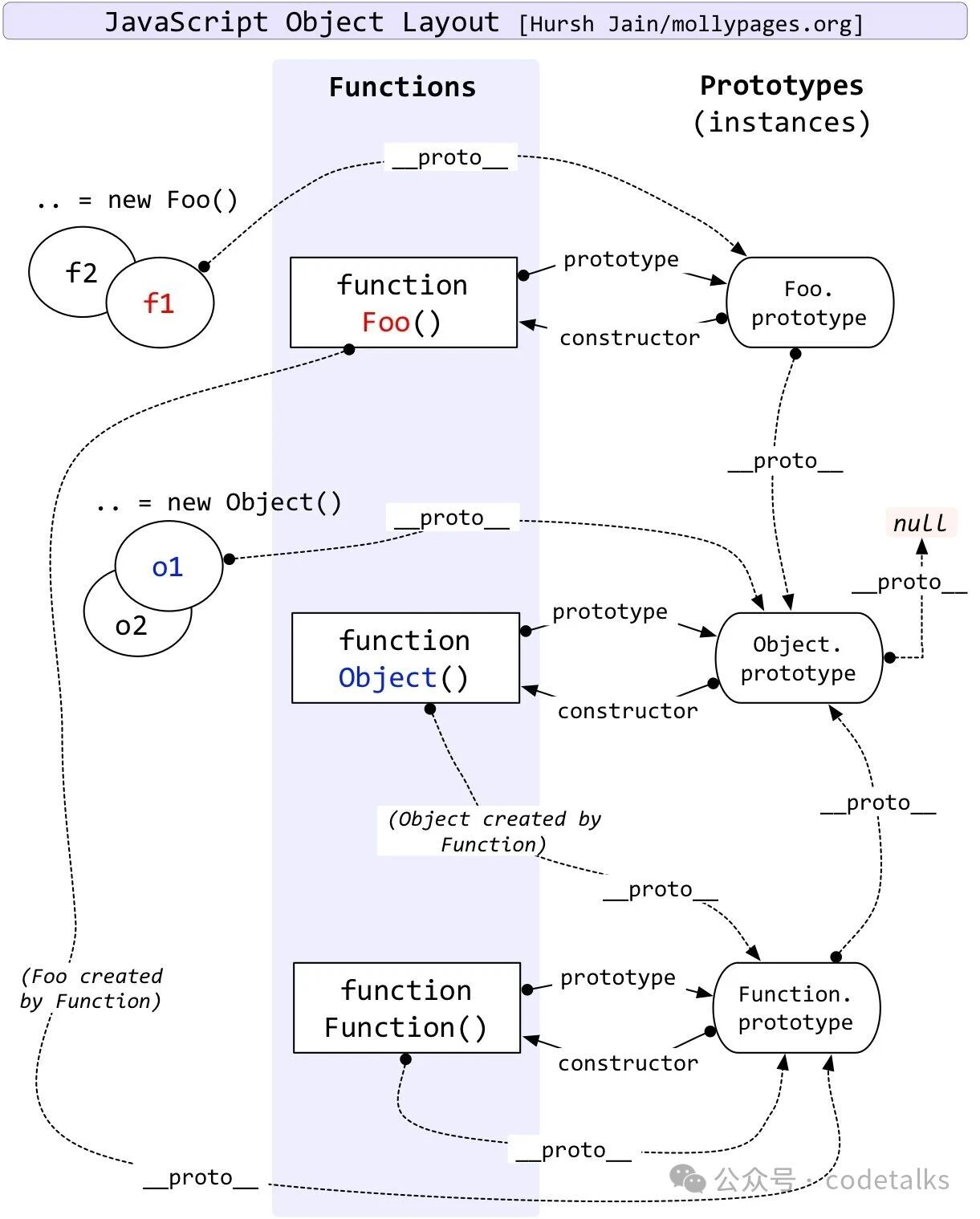
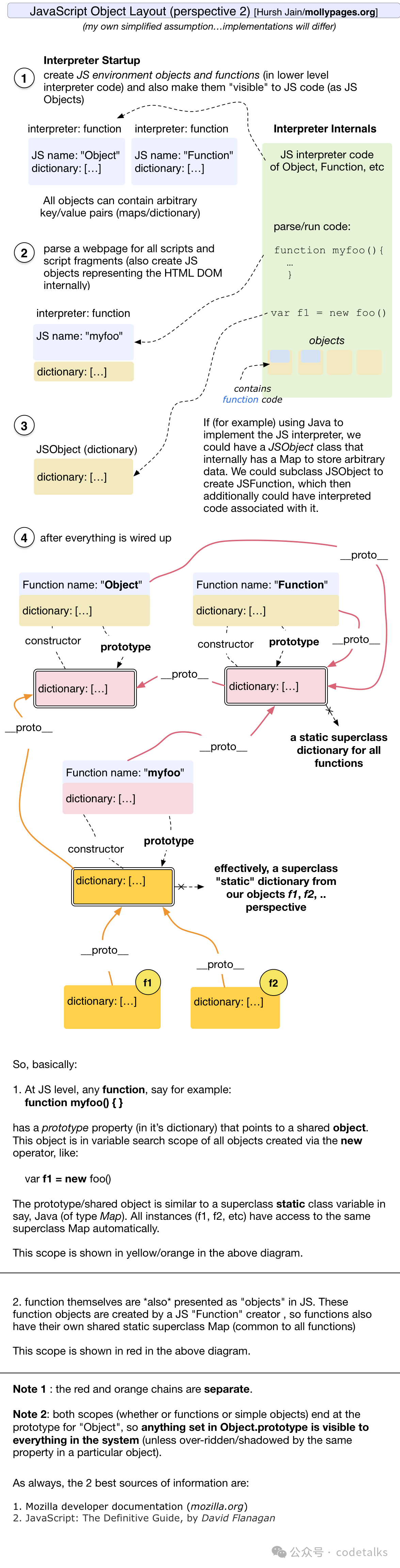
-
Object.create()方法创建一个新的对象,并允许你指定一个将被用作新对象原型的对象。即person = Object.create(personPrototype); person.__proto__等于personPrototype -
直接在对象中定义的属性,如这里的
name,被称为自有属性,你可以使用静态方法Object.hasOwn(obj,'propName')检查一个属性是否是自有属性。也可以在这里使用非静态方法obj.hasOwnProperty('propName')important
记住:原型是一个对象,是对象就有
__proto__属性
通过person = Object.create(personPrototype)创建的对象,对象的原型就是personPrototype
通过构造函数创建的person = new Person()创建的对象,对象的原型就是Person.prototyp
// 一个构造函数
function Box(value) {
  this.value = value;
}

// 使用 Box() 构造函数创建的所有盒子都将具有的属性
Box.prototype.getValue = function () {
  return this.value;
};

const boxes = [new Box(1), new Box(2), new Box(3)];
-
new Box(1)是通过 Box 构造函数创建的一个实例。通过构造函数创建的每一个实例都会自动将构造函数的prototype属性作为其[[Prototype]]。即,Object.getPrototypeOf(new Box()) === Box.prototype。Box.prototype默认具有一个自有属性:constructor,它引用了构造函数本身。即,Box.prototype.constructor === Box。这允许我们在任何实例中访问原始构造函数。 -
Box.prototype仅在构造实例时有用。它与Box.[[Prototype]]无关,后者是构造函数的自有原型,即Function.prototype。也就是说,Object.getPrototypeOf(Constructor) === Function.prototype。默认情况下,Constructor.prototype 是一个普通对象——即Object.getPrototypeOf(Constructor.prototype) === Object.prototype -
JavaScript 中的一些字面量语法会创建隐式设置
[[Prototype]]的实例
// 对象字面量(没有 `__proto__` 键)自动将 `Object.prototype` 作为它们的 `[[Prototype]]`
const object = { a: 1 };
Object.getPrototypeOf(object) === Object.prototype; // true

// 数组字面量自动将 `Array.prototype` 作为它们的 `[[Prototype]]`
const array = [1, 2, 3];
Object.getPrototypeOf(array) === Array.prototype; // true

// 正则表达式字面量自动将 `RegExp.prototype` 作为它们的 `[[Prototype]]`
const regexp = /abc/;
Object.getPrototypeOf(regexp) === RegExp.prototype; // true
-
[[Prototype]]只是对象的“内部属性”。 -
使用不同的方法来创建对象和改变原型链的优缺点
- 对象初始化器
- 优点 被所有的现代引擎所支持。将
__proto__属性指向非对象的值只会被忽略,而非抛出异常。与Object.prototype.__proto__ setter相反,对象字面量初始化器中的__proto__是标准化,被优化的。甚至可以比Object.create更高效。在创建对象时声明额外的自有属性比 Object.create 更符合习惯。 - 缺点 不支持 IE10 及以下的版本。对于不了解其与
Object.prototype.__proto__访问器差异的人可能会将两者混淆。
- 优点 被所有的现代引擎所支持。将
- 构造函数
- 优点:所有引擎都支持——一直到 IE 5.5。此外,其速度很快、非常标准,且极易被 JIT 优化。
- 缺点:要使用这个方法,必须初始化该函数。在初始化过程中,构造函数可能会存储每一个对象都必须生成的唯一信息。这些唯一信息只会生成一次,可能会导致问题。构造函数的初始化过程可能会将不需要的方法放到对象上。这两者在实践中通常都不是问题。
Object.create- 优点:被所有现代引擎所支持。允许在创建时直接设置对象的
[[Prototype]],这允许运行时进一步优化对象。还允许使用Object.create(null)创建没有原型的对象。 - 缺点:不支持 IE8 及以下版本。但是,由于微软已经停止了对运行 IE8 及以下版本的系统的扩展支持,这对大多数应用程序而言应该不是问题。此外,如果使用了第二个参数,慢对象的初始化可能会成为性能瓶颈,因为每个对象描述符属性都有自己单独的描述符对象。当处理上万个对象描述符时,这种延时可能会成为一个严重的问题。
- 优点:被所有现代引擎所支持。允许在创建时直接设置对象的
- 类
- 优点:被所有现代引擎所支持。非常高的可读性和可维护性。私有属性是原型继承中没有简单替代方案的特性。
- 缺点:类,尤其是带有私有属性的类,比传统的类的性能要差(尽管引擎实现者正在努力改进这一点)。不支持旧环境,通常需要转译器才能在生产中使用类。
Object.setPrototypeOf- 优点:被所有现代引擎所支持。允许动态地修改对象的原型,甚至可以强制为使用
Object.create(null)创建的无原型对象设置原型。 - 缺点:性能不佳。如果可以在创建对象时设置原型,则应避免此方法。许多引擎会优化原型,并在调用实例时会尝试提前猜测方法在内存中的位置;但是动态设置原型会破坏这些优化。它可能会导致某些引擎重新编译你的代码以进行反优化,以使其按照规范工作。不支持 IE8 及以下版本。
- 优点:被所有现代引擎所支持。允许动态地修改对象的原型,甚至可以强制为使用
__proto__- 优点:被所有现代引擎所支持。将
__proto__设置为非对象的值只会被忽略,而非抛出异常。 - 缺点:性能不佳且已被弃用。许多引擎会优化原型,并在调用实例时会尝试提前猜测方法在内存中的位置;但是动态设置原型会破坏这些优化,甚至可能会导致某些引擎重新编译你的代码以进行反优化,以使其按照规范工作。不支持 IE10 及以下版本。
__proto__访问器是规范中可选的特性,因此可能无法在所有平台上使用。你几乎总是应该使用Object.setPrototypeOf代替
- 优点:被所有现代引擎所支持。将
- 对象初始化器
-
要检查对象是否具有在其自身上定义的属性,而不是在其原型链上的某个地方,则有必要使用
obj.hasOwnProperty('propName')或Object.hasOwn(obj,'propName')方法。
赋值、浅拷贝、深拷贝
const original = {
  name: 'Alice',
  age: 25,
  hobbies: ['reading', 'coding']
};
- 直接赋值:通常指的是将一个对象的引用赋值给另一个变量,而不是复制对象本身。这意味着两个变量指向同一个对象。
const copy = original; // 直接赋值
copy.hobbies.push('painting');
copy.name='zmy';

console.log(original); // {name:'Alice, age:25, hobbies:Array(3)}
console.log(copy);     // {name:'Alice, age:25, hobbies:Array(3)}
console.log(original.hobbies); // 输出 ["reading", "coding", "painting"]
console.log(copy.hobbies);     // 输出 ["reading", "coding", "painting"]
- 浅拷贝:浅拷贝创建了一个新的对象,并复制了原始对象的顶层属性。如果属性是引用类型(如对象或数组),则复制的是这些引用类型的引用,而不是实际的内容。
const shallowCopy = Object.assign({}, original); // 浅拷贝
shallowCopy.hobbies.push('painting');
shallowCopy.name='zmy';

console.log(original);    // {name:'Alice, age:25, hobbies:Array(3)}
console.log(shallowCopy); // {name:'zmy, age:25, hobbies:Array(3)}
console.log(original.hobbies); // 输出 ["reading", "coding", "painting"]
console.log(shallowCopy.hobbies); // 输出 ["reading", "coding", "painting"]
- 深拷贝:深拷贝不仅复制顶层属性,还会递归地复制对象内的所有引用类型。这意味着新对象及其所有嵌套的对象都是完全独立的,与原对象没有关联。
// 使用 JSON.parse 和 JSON.stringify 进行深拷贝
const deepCopy = JSON.parse(JSON.stringify(original));
deepCopy.hobbies.push('painting');
deepCopy.name='zmy';

console.log(original);    // {name:'Alice, age:25, hobbies:Array(2)}
console.log(deepCopy); // {name:'zmy, age:25, hobbies:Array(3)}
console.log(original.hobbies); // 输出 ["reading", "coding"]
console.log(deepCopy.hobbies); // 输出 ["reading", "coding", "painting"]
this问题
-
出现this问题的大多涉及到嵌套函数,遇到这种情况需注意
-
箭头函数没有自己的this,它从定义的外部作用域获取this
-
箭头函数的特点
- 不绑定
this:箭头函数不会创建自己的this上下文。这意味着箭头函数内部的 this 值是从外围作用域继承的。 - 词法
this:箭头函数内部的this值是基于词法作用域(即定义它的上下文)来决定的,而不是基于函数调用的位置。 - 没有
arguments对象:箭头函数没有自己的arguments对象,但是可以使用剩余参数语法(...args)来模拟arguments。 - 没有
constructor属性:箭头函数没有constructor属性,因此不能用作构造函数来创建新对象。 - 没有
prototype属性:箭头函数没有prototype属性,因此不能用于原型链继承。
- 不绑定
-
使用
Function对象的实例函数改变this的指向。
Promise
important
Promise就是一个承诺,预期会完成某事(异步操作),然后把对完成后的结果的处理方式(成功和失败完成的回调函数)告诉 Promise,预期的事完成后,他会自动去处理。
- Promise 的优雅之处在于
then()本身也会返回一个 Promise,这个 Promise 将指示then()中调用的异步函数的完成状态。 - Promise 是一个异步操作的返回对象(函数返回对象),代表操作的最终完成或者失败。可以在它上面绑定回调函数,这样我们就不需要在一开始把回调函数作为参数传入这个函数了。
// 直接传回调函数
createAudioFileAsync(audioSettings, successCallback, failureCallback);
// 绑定回调函数
createAudioFileAsync(audioSettings).then(successCallback, failureCallback);
catch(failureCallback)等同于then(null, failureCallback),如果错误处理代码对所有步骤都是一样的,你可以把它附加到链的末尾:- 如果回调函数也返回一个 Promise 对象,那么会等待这个 Promise 敲定,然后下一个
then中的回调函数会接收他的兑现值(就是这个 Promise 中异步函数的返回值),如果上一个 then 中启动一个 Promise 但没有返回,那么就这个 Promise 的的兑现值就无法应用于后续的 then 中的回调函数。
doSomething()
  .then((url) => {
    // fetch(url) 前缺少 `return` 关键字。
    fetch(url);
  })
  .then((result) => {
    // result 是 undefined,因为上一个处理器没有返回任何东西。
    // 无法得知 fetch() 的返回值,也无法知道它是否成功。
  });
tip
经验法则是,每当你的操作遇到一个 Promise,就返回它,并把它的处理推迟到下一个 then 处理器中。
const listOfIngredients = [];

doSomething()
  .then((url) => {
    // fetch 调用前面现在包含了 `return` 关键字。
    return fetch(url)
      .then((res) => res.json())
      .then((data) => {
        listOfIngredients.push(data);
      });
  })
  .then(() => {
    console.log(listOfIngredients);
    // listOfIngredients 现在将包含来自 fetch 调用的数据。
  });

// 将嵌套链扁平化为单链,这样更简单,也更容易处理错误
doSomething()
  .then((url) => fetch(url))
  .then((res) => res.json())
  .then((data) => {
    listOfIngredients.push(data);
  })
  .then(() => {
    console.log(listOfIngredients);
  });
- Promise 定义一个异步任务
executor,executor的参数是resolve和reject回调函数
const myPromise = new Promise((resolve, reject) => {
  setTimeout(() => {
    if(Math.random() < 0.5)
      resolve(value);
    else
      reject(reason);
  }, 300);
});
myPromise.then(onFulfilled, onRejected);
- Promise的
.then()方法最多接受两个参数;第一个参数是 Promise 兑现时的回调函数resolve,第二个参数是 Promise 拒绝时的回调函数reject。
important
- 在 Promise 中,一旦调用了
resolve,则该 Promise 的状态立即变为已兑现,会立马调用 then 中的兑现回调函数onFulfilled,传给resolve的参数(即Promise的兑现值value)也是传给onFulfilled的参数(也可以理解为用onFulfilled替换resolve),onFulfilled的返回值又称为 then 返回的 Promise 对象的兑现值。如果onFulfilled不是一个函数,则内部会被替换为一个恒等函数((x) => x),它只是简单地将兑现值向后传递。 - 同样的,调用了
reject,Promise 就变为已拒绝,立即调用onRejected,传给rejct的参数(拒绝值,通常是一个Error对象)也就是传给onRejected的参数,它的返回值成为catch返回的 Promise 的兑现值。如果onRejected不是一个函数,则内部会被替换为一个抛出器函数((x) => { throw x; }),它会抛出它收到的拒绝原因。 - 如果
value或reason中有任意一个被省略,Promise 将会被兑现(fulfilled)或拒绝(rejected)为undefined。
-
then 返回一个 Promise 对象(假设为p),p 的行为取决于处理函数(
onFulfilled和onRejected)的执行结果,如果处理函数返回:- 返回一个值:p 以该返回值作为其兑现值。
- 没有返回任何值:p 以
undefined作为其兑现值。 - 抛出一个错误:p 抛出的错误作为其拒绝值。
- 返回一个已兑现的 Promise 对象:p 以该 Promise 的值作为其兑现值。
- 返回一个已拒绝的 Promise 对象:p 以该 Promise 的值作为其拒绝值。
- 返回另一个待定的 Promise 对象:p 保持待定状态,并在该 Promise 对象被兑现或拒绝后立即以该 Promise 的值作为其兑现值或拒绝值。
-
executor通常会封装某些提供基于回调的 API 的异步操作func(x,callback),回调函数callback在executor代码中定义(resolve, reject) => {},因此它可以访问resolve和reject。
const funcPromise = (x) =>
  new Promise((resolve, reject) => {
    console.log('resolve1',resolve)
    console.log('reject1',reject)
    func(x, (error, result) => {
      console.log('error',error)
      console.log('result',result)
      if (error) {
        console.log('reject2',reject)
        reject(new Error(result));
      } else {
        console.log('resolve2',resolve)
        resolve(result*2);
      }
    });
  });
-
executor的完成状态对 Promise 的状态影响有限:executor函数的返回值会被忽略。executor函数中的return语句仅影响控制流程,调整函数某个部分是否执行,但不会影响 Promise 的兑现值。如果executor函数退出,且未来不可能调用resolve或reject(例如,没有安排异步任务),那么 Promise 将永远保持待定状态。(只有调用了resolve或reject才会改变Promise的状态)- 如果在
executor函数中抛出错误,则 Promise 将被拒绝,除非resolve或reject已经被调用。
-
如果先调用
resolve,则传入的值将解决。- 如果传入了另一个
thenable对象,Promise 可能会保持待定状态; - 在传入非
thenable值的大多数情况下,Promise 变为已兑现状态, - 在解析值无效的情况下,Promise 变为已拒绝状态。
- 如果传入了另一个
-
如果先调用
reject,则 Promise 立即变为已拒绝状态。 -
一旦
resolve或reject中的一个被调用,Promise 将保持解决状态。只有第一次调用resolve或reject会影响 Promise 的最终状态,随后对任一函数的调用都不能更改兑现值或拒绝原因,也不能将其最终状态从“已兑现”转换为“已拒绝”或相反。 -
如果
executor抛出错误,则 Promise 被拒绝。但是,如果resolve或reject中的一个已经被调用(因此 Promise 已经被解决),则忽略该错误。 -
解决 Promise 不一定会导致 Promise 变为已兑现或已拒绝(即已敲定)。Promise 可能仍处于待定状态,因为它可能是用另一个
thenable对象解决的,但它的最终状态将与已解决的thenable对象一致。 -
一旦 Promise 敲定,它会(异步地)调用任何通过
then()、catch() 或 finally()关联的进一步处理程序。最终的兑现值或拒绝原因在调用时作为输入参数传给兑现和拒绝处理程序 -
例子
const funcPromise = (x) =>
  new Promise((resolve, reject) => {
    console.log('resolve1',resolve)
    console.log('reject1',reject)
    func(x, (error, result) => {
      console.log('error',error)
      console.log('result',result)
      if (error) {
        console.log('reject2',reject)
        reject(new Error(result));
        console.log('rejected')
        throw 'reject error'
      } else {
        console.log('resolve2',resolve)
        resolve(result*2);
        console.log('resolved')
        throw 'resolve error'
      }
    });
  });
function func(x,f){
  if(x<5){
    // throw new Error('a error')
    // throw 'a error'
    f(true, 3)
  }
  else{
    console.log('success')
    f(false,x)
  }
}
funcPromise(4)
  .then((result) => console.log('the result is ',result))
  .catch((error) => console.error("读取文件失败"+error.message));
-
resolve函数有以下行为:- 如果它被调用时传入了这个新建的 Promise 对象本身(即它所“绑定”的 Promise 对象),则 Promise 对象会被拒绝并抛出一个
TypeError错误。 - 如果它使用一个非
thenable的值(基本类型,或一个没有then属性或then属性不可调用的对象),则该 Promise 对象会被立即以该值兑现。 - 如果它被调用时传入了一个
thenable对象(包括另一个 Promise 实例),则该thenable对象的then方法将被保存并在未来被调用(它总是异步调用)。then方法将被调用并传入两个回调函数,这两个函数的行为与传递给executor函数的resolve和reject函数完全相同。如果调用then方法时出现错误,则当前的 Promise 对象会被拒绝并抛出这个错误。
- 如果它被调用时传入了这个新建的 Promise 对象本身(即它所“绑定”的 Promise 对象),则 Promise 对象会被拒绝并抛出一个
-
调用
resolve函数会使 Promise 对象变为已解决状态,因此再次调用resolve或reject函数没有任何效果。然而,Promise 对象可能处于以下任何状态之一:待定、已兑现或已拒绝。 -
错误处理:一遇到异常抛出,浏览器就会顺着 Promise 链寻找下一个
onRejected失败回调函数或者由.catch()指定的回调函数,就像同步代码中的try中出现异常会立即跳转到catch部分 -
有可能会在一个回调失败之后继续使用链式操作,即,在
catch之后再使用一个then,这对于在链式操作中抛出一个失败之后,再次进行新的操作会很有用 -
嵌套:嵌套是一种可以限制
catch语句的作用域的控制结构写法。明确来说,嵌套的catch只会捕获其作用域及以下的错误,而不会捕获链中更高层的错误。如果使用正确,可以实现细粒度的错误恢复。 -
Promise 拒绝事件
-
当一个 Promise 拒绝事件未被任何处理器处理时,它会冒泡到调用栈的顶部。在 Web 上,当 Promise 被拒绝时,会有下文所述的两个事件之一被派发到全局作用域
rejectionhandled(拒绝已处理):当 Promise 被拒绝、并且在 reject 函数处理该拒绝事件之后会派发此事件。unhandledrejection(拒绝未处理):当 Promise 被拒绝,但没有提供 reject 函数来处理该拒绝事件时,会派发此事件。
-
上述两种事件(类型为
PromiseRejectionEvent)都有两个属性,一个是promise属性,该属性指向被拒绝的 Promise,另一个是reason属性,该属性用来说明 Promise 被拒绝的原因。
- 使用 fetch() API
const fetchPromise = fetch(
  "https://mdn.github.io/learning-area/javascript/apis/fetching-data/can-store/products.json",
);

console.log(fetchPromise);

fetchPromise.then((response) => {
  console.log(`已收到响应:${response.status}`);
});

console.log("已发送请求……");
- 链式使用 Promise
const fetchPromise = fetch(
  "https://mdn.github.io/learning-area/javascript/apis/fetching-data/can-store/products.json",
);

fetchPromise
  .then((response) => response.json())
  .then((data) => {
    console.log(data[0].name);
  });
- 错误捕获
const fetchPromise = fetch(
  "bad-scheme://mdn.github.io/learning-area/javascript/apis/fetching-data/can-store/products.json",
);

fetchPromise
  .then((response) => {
    if (!response.ok) {
      throw new Error(`HTTP 请求错误:${response.status}`);
    }
    return response.json();
  })
  .then((json) => {
    console.log(json[0].name);
  })
  .catch((error) => {
    console.error(`无法获取产品列表:${error}`);
  });
-
Promise 的几种状态:
- 待定(pending挂起):初始状态,既没有被兑现,也没有被拒绝。这是调用 fetch() 返回 Promise 时的状态,此时请求还在进行中。
- 已兑现(fulfilled):意味着操作成功完成。当 Promise 完成时,它的 then() 处理函数被调用。
- 已拒绝(rejected):意味着操作失败。当一个 Promise 失败时,它的 catch() 处理函数被调用。
- 已敲定(settled):一个 Promise 已经被兑现或拒绝,即不再处于待定状态
- 已解决(resolved):这个术语来描述 Promise——这意味着该 Promise 已经敲定(settled),或为了匹配另一个 Promise 的最终状态而被“锁定(lock-in)”,进一步解决或拒绝它都没有影响。
tip
- 这里的“成功”或“失败”的含义取决于所使用的 API:例如,fetch() 认为服务器返回一个错误(如 404 Not Found)时请求成功,但如果网络错误阻止请求被发送,则认为请求失败。
- 各种状态的官方解释
- 合并使用多个 Promise
- 需要所有的 Promise 都得到实现,但它们并不相互依赖。将它们一起启动然后在它们全部被兑现后得到通知
- 使用
Promise.all()方法。它接收一个 Promise 数组,并返回一个单一的 Promise。 - 由
Promise.all()返回的 Promise:- 当且仅当数组中所有的 Promise 都被兑现时,才会通知
then()处理函数并提供一个包含所有响应的数组,数组中响应的顺序与被传入Promise.all()的 Promise 的顺序相同。 - 会被拒绝——如果数组中有任何一个 Promise 被拒绝。此时,
catch()处理函数被调用,并提供被拒绝的 Promise 所抛出的错误。
- 当且仅当数组中所有的 Promise 都被兑现时,才会通知
const fetchPromise1 = fetch(
  "https://mdn.github.io/learning-area/javascript/apis/fetching-data/can-store/products.json",
);
const fetchPromise2 = fetch(
  "https://mdn.github.io/learning-area/javascript/apis/fetching-data/can-store/not-found",
);
const fetchPromise3 = fetch(
  "https://mdn.github.io/learning-area/javascript/oojs/json/superheroes.json",
);

Promise.all([fetchPromise1, fetchPromise2, fetchPromise3])
  .then((responses) => {
    for (const response of responses) {
      console.log(`${response.url}:${response.status}`);
    }
  })
  .catch((error) => {
    console.error(`获取失败:${error}`);
  });
- 如果需要一组 Promise 中的某一个 Promise 的兑现,而不关心是哪一个。在这种情况下,需要
Promise.any()。在 Promise 数组中的任何一个被兑现时它就会被兑现,如果所有的 Promise 都被拒绝,它也会被拒绝。tip
在这种情况下,我们无法预测哪个获取请求会先被兑现。
Promise.any()和Promise.all()这些方法都是并发运行 Promise 的——一系列 Promise 同时启动,而不是彼此等待。顺序执行也是可能的,这需要一些巧妙的 JavaScript 手段:
[func1, func2, func3]
  .reduce((p, f) => p.then(f), Promise.resolve())
  .then((result3) => {
    /* 使用 result3 */
  });

// 上面的代码等同于:
Promise.resolve()
  .then(func1)
  .then(func2)
  .then(func3)
  .then((result3) => {
    /* 使用 result3 */
  });
tip
reduce()方法对数组中的每个元素按序执行一个提供的reducer函数,每一次运行reducer会将先前元素的计算结果作为参数传入,最后将其结果汇总为单个返回值。- 第一次执行回调函数时,不存在“上一次的计算结果”。如果需要回调函数从数组索引为 0 的元素开始执行,则需要传递初始值。否则,数组索引为 0 的元素将被用作初始值,迭代器将从第二个元素开始执行(即从索引为 1 而不是 0 的位置开始)。
const array1 = [1, 2, 3, 4];

// 0 + 1 + 2 + 3 + 4
const initialValue = 0;
const sumWithInitial = array1.reduce(
  (accumulator, currentValue) => accumulator + currentValue,
  initialValue,
);

console.log(sumWithInitial);
// Expected output: 10
async/await 和 Promise 对比
-
async关键字提供了一种更简单的方法来处理基于异步 Promise 的代码。在一个函数的开头添加async,就可以使其成为一个异步函数。 -
await:在调用一个返回 Promise 的函数之前使用await关键字。这使得代码在该点上等待,直到 Promise 被完成,这时 Promise 的响应被当作返回值(原本返回的是一个 Promise 对象),或者被拒绝的响应被作为错误抛出。await强制异步操作以串联的方式完成。 -
只能在
async函数或者是 JavaScript 模块(export,import)中使用await,这意味着不能在普通脚本使用await -
async会把返回结果包装成Promise,await一个返回Promise的函数,会在Promise结束时,自动从Promise响应中取出结果(resolve的值) -
async函数返回Promise时会自动"展平",不会双重包装。await一个Promise<T>永远得到T,不是Promise<T>。 -
纯 Promise 写法(.then 链式调用)
// 定义:不用 async/await
get<T>(url: string): Promise<T> {
  return axiosInstance.get<BaseResponse<T>>(url)
    .then(res => res.data.result)
}

// 调用方式 A:用 .then()
http.get<User>('/user/1')
  .then(user => {
    console.log(user.name)  // user: User
  })

// 调用方式 B:用 await(在 async 函数内)
async function fetchUser() {
  const user = await http.get<User>('/user/1')
  console.log(user.name)
}
- 纯 async/await
// 定义:用 async/await
async get<T>(url: string): Promise<T> {
  const res = await axiosInstance.get<BaseResponse<T>>(url)  // ✅ 内部 await
  return res.data.result
}

// 调用方式 A:用 await(在 async 函数内)
async function fetchUser() {
  const user = await http.get<User>('/user/1')  // ✅ 可以!
  console.log(user.name)
}

// 调用方式 B:用 .then()
http.get<User>('/user/1')
  .then(user => {
    console.log(user.name)  // ✅ 也可以!
  })
客户端Web API
-
浏览器 API 内置于 Web 浏览器中,能从浏览器和电脑周边环境中提取数据
-
第三方 API 缺省情况下不会内置于浏览器中,通常必须在 Web 中的某个地方获取代码和信息。
-
JavaScript、API 和其他 JavaScript 工具之间的关系
- JavaScript——一种内置于浏览器的高级脚本语言,你可以用来实现 Web 页面/应用中的功能。注意 JavaScript 也可用于其他像 Node 这样的编程环境。
- 客户端 API——内置于浏览器的结构程序,位于 JavaScript 语言之上,使你可以更容易的实现功能。
- 第三方 API——置于第三方普通的结构程序(例如 Disqus、Facebook),使你可以在自己的 Web 页面中使用这些平台的某些功能(例如在你的 Web 页面显示 Disqus 评论)。
- JavaScript 库——通常是包含具有自定义函数的一个或多个 JavaScript 文件,把这些文件关联到你的 Web 页以加快或启用常见的功能的编码。示例包括 jQuery、Mootools 和 React。
- JavaScript 框架——从库开始的下一步,JavaScript 框架(例如 Angular 和 Ember)视图把 HTML、CSS、JavaScript 和其他安装的技术打包在一起,然后用来从头编写一个完整的 Web 应用。库和框架的主要区别在于“控制反转”。调用库中的方法时,开发人员处于控制地位。而框架的控制权则相反:框架调用开发人员的代码。
-
常见浏览器 API
- 操作文档的 API 内置于浏览器中。最明显的例子是
DOM(文档对象模型)API - 从服务器获取数据的 API 用于更新网页的一小部分,包括
Axios API(三方库,可用于Node.js),Fetch API(内置于浏览器),XMLHttpRequest API,Ajax API - 用于绘制和操作图形的 API 最流行的是允许你以编程方式更新包含在 HTML
<canvas>元素中的像素数据以创建 2D 和 3D 场景的 Canvas 和 WebGL。 - 音频和视频 API 例如 HTMLMediaElement、Web 音频 API 和 WebRTC
- 设备 API 使得你可以与设备的硬件进行交互:例如,使用地理位置 API来访问设备的 GPS,从而查找用户的位置。
- 客户端存储 API 可以在客户端存储数据,创建一个保存页面加载状态的应用,甚至让设备在处于离线状态时可用。有多种选项可供选择,例如使用 Web 存储 API 的简单的键/值存储以及使用 IndexedDB API 的更复杂的数据库存储。
- 操作文档的 API 内置于浏览器中。最明显的例子是
-
常见第三方 API
- 地图 API(例如 Mapquest 和 Google Maps API),允许你在网页上对地图执行多种操作。
- Facebook API 套件,允许你将 Facebook 生态系统中的各个部分应用到你的应用并使之受益,比如说它提供了通过 Facebook 账户登录、接受应用内支付、推送有针对性的广告活动等功能。
- Telegram API,允许你在网站中潜入来自 Telegram 频道的内容,此外还提供了对机器人的支持。
- YouTube API,允许你将 Youtube 上的视频嵌入到网站中去,同时提供搜索 Youtube、创建播放列表等众多功能。
- Pinterest API,提供了管理 Pinterest 图板和图钉的工具,以便将它们纳入你的网站。
- Twilio API,为你的应用提供了针对语音通话和视频聊天的框架,以及从你的 app 发送短信息或多媒体信息等诸多功能。
- Disqus API,提供了一个可集成到网站中的评论平台。
- Mastodon API,让你以编程方式操作 Mastodon 社交网络的特性。
- IFTTT API,允许你通过一个平台集成多个 API。
-
文档对象模型
DOM- Node 是一个接口,各种类型的 DOM API 对象会从这个接口继承
- HTMLElement 接口表示所有的 HTML 元素。一些 HTML 元素直接实现了 HTMLElement 接口,其他的间接实现 HTMLElement 接口。
- Element 是最通用的基类,Document 中的所有元素对象(即表示元素的对象)都继承自它。
- Text 接口表示 DOM 树中的一个文本节点。
- 推荐使用
document.querySelector():获取元素的引用,返回 Node 对象,使用ele根据元素名查找,使用#id根据元素id属性查找,使用.class根据class属性查找, document.querySelector("a"):匹配文档中出现的第一个<a>元素document.querySelectorAll():匹配文档中与选择器相匹配的每个元素,返回NodeList 的类数组对象(不是一个数组)Document.getElementById():选择一个 id 属性值已知的元素,例如<p id="myId">My paragraph</p>。ID 作为参数传递给函数,即const elementRef = document.getElementById('myId')。Document.getElementsByTagName():返回页面中包含的所有已知类型元素的数组。如<p>、<a>等。元素类型作为参数传递给函数,即const elementRefArray = document.getElementsByTagName('p')。Document.createElement('TagName'):创建新的元素Document.createTextNode('text'):创建一个文本节点HTMLElement.style 属性,元素的内联样式Element.setAttribute('prop', 'propValue'):它接受两个参数:想在元素上设置的属性、要为它设置的值
JS模块
- 单个导出,在函数,var,let,const, 和类前面添加
export let varName - 多个导出,在文件底部添加
export { varName, funName, className } - 导入,在文件头部:
import { varName, funName, className } from 'path/moduleName.js',模块文件的路径是相对于站点根目录的相对路径, - 应用模块到 HTML:
<script type="module" src="main.js"></script> - 默认导出:在文件底部
export default funName;,或者export default function(ctx) { },导入默认函数:import funName from "./modules/square.js"; - 变量不能直接默认导出,需要先定义后导出
note
默认导出不加大括号,因为每个模块只能有一个默认导出,默认导入时为匿名函数命名
- 重命名导出与导入
// inside module.js
export { function1 as newFunctionName, function2 as anotherNewFunctionName };

// inside main.js
import { newFunctionName, anotherNewFunctionName } from "/modules/module.js";
- 创建模块对象
// 获取 module.js 中所有可用的导出
import * as Module from "/modules/module.js";
Module.function1();
Module.function2();
jQuery
$().fun()和$.fun()的区别$().fun()是在 jQuery 对象上调用的方法,作为一个选择器,被称为$.fn命名空间或者 jQuery 原型。其会自动接收和返回选择的对象作为this(像是成员函数,非静态的)$.fun()是在 jQuery 命名空间上的,或者称为核心 jQuery 方法。不会传递任何参数,返回值也是不定的。(像是静态方法)
- 使用回调函数:
- 没有参数的回调:
$.get( "myhtmlpage.html", myCallBack ); - 有参数的回调(实际就是用无参数的匿名函数包裹起来):
$.get( "myhtmlpage.html", function() { myCallBack( param1, param2 );});
- 没有参数的回调:
$(document).ready()在 DOM 准备后执行,等价于$()$(window).on("load", function() { ... })在整个页面加载好后执行一次var $j = jQuery.noConflict();防止命名冲突,命名别名,jQuery.noConflict()返回 jQuery 函数的别名
jQuery.noConflict();
// 局部使用,将 $ 传递给函数
jQuery(document).ready(function( $ ) {
    // You can use the locally-scoped $ in here as an alias to jQuery.
    $( "div" ).hide();
});
// 使用立即调用函数表达式
(function( $ ) {
    // Your jQuery code here, using the $
})( jQuery );
$("a").attr()作为一个 getter 或 setter 使用:
// 作为 setter
$( "a" ).attr( "href", "allMyHrefsAreTheSameNow.html" );
// 设定多个属性值
$( "a" ).attr({
    title: "all titles are the same too!",
    href: "somethingNew.html"
});
// 作为getter
$( "a" ).attr( "href" )
-
其他的方法也类似,
$("a").html('sss')设置所有a元素的html属性的值,其返回一个 jQuery 对象,可以继续链式调用方法,.end()方法让选择重新回到原始的元素 -
$("a").html获取第一个a元素的html属性的值,.text方法例外,总是返回所有元素的值 -
使用选择器总是能返回一个对象,即使没有元素被选择,
if( $('a.foo') )总是返回true,$('a.foo').length返回有多少元素被选中,可以将选择的元素存储在变量中var ele = $('a.foo'),但是 DOM 改变时,jQuery 对象不会自动更新,只能重选 -
选择器返回的每个包装的 jQuery 对象都是唯一的。即使对象是使用相同的选择器创建的,或者包含对完全相同的 DOM 元素的引用,他们也是唯一的。即
$( "#logo" ) === $( "#logo" )始终返回false,然而这两个对象包含相同的 DOM 元素,即$( "#logo" ).get( 0 ) === $( "#logo" ).get( 0 )返回true -
jQuery 对象上不存在原生 DOM 方法和属性,反之亦然
-
精选过滤选择的元素
$( "div.foo" ).has( "p" );         // div.foo elements that contain <p> tags
$( "h1" ).not( ".bar" );           // h1 elements that don't have a class of bar
$( "ul li" ).filter( ".current" ); // unordered list items with class of current
$( "ul li" ).first();              // just the first unordered list item
$( "ul li" ).eq( 5 );              // the sixth, it return a jQuery object that can be call other method chainly
$( "ul li" ).get( 5 );              // the sixth, it return native DOM element itself, not a jQuery object.
$( "ul li" )[ 5 ];                  // equivalent to $( "ul li" ).get( 5 );
- 选择表单元素:
$( "form :checked" );已选择的单选按钮或者复选框,或者是下拉框
note
- Attributes 是 HTML 标签的一部分,通常用于初始化 DOM 对象的属性。
- Properties 是 DOM 对象的一部分,反映了元素的当前状态,可以动态变化。
-
$( "h1" ).css( "fontSize" );返回 CSS 属性,例如19px。 -
$( "h1" ).css( "fontSize", "100px" );设置 CSS 属性 -
$( "h1" ).css({ fontSize: "100px", color: "red" });设置多个属性,使用.css可以使用fonst-size,而不需要转为驼峰格式 -
$.each()用于非 jQuery 集合的普通对象、数组、类数组对象。对于 jQuery 集合,使用.each()。 -
.map()最后要跟.get()方法将结果收集为数组,$.map()不需要,因为.get()不是原生的 JS 方法 -
.index()以选择元素的父元素为依据,返回该元素在父元素子节点中的索引,以 0 为基础,选择多个元素的话默认返回第一个
ajax
// Using the core $.ajax() method
$.ajax({

    // The URL for the request
    url: "post.php",

    // The data to send (will be converted to a query string)
    data: {
        id: 123
    },

    // Whether this is a POST or GET request
    type: "GET",

    // The type of data we expect back
    dataType : "json",
})
  // Code to run if the request succeeds (is done);
  // The response is passed to the function
  .done(function( json ) {
     $( "<h1>" ).text( json.title ).appendTo( "body" );
     $( "<div class=\"content\">").html( json.html ).appendTo( "body" );
  })
  // Code to run if the request fails; the raw request and
  // status codes are passed to the function
  .fail(function( xhr, status, errorThrown ) {
    alert( "Sorry, there was a problem!" );
    console.log( "Error: " + errorThrown );
    console.log( "Status: " + status );
    console.dir( xhr );
  })
  // Code to run regardless of success or failure;
  .always(function( xhr, status ) {
    alert( "The request is complete!" );
  });
$.ajax({
  url: '请求的URL',
  type: '请求类型 (GET, POST, PUT, DELETE等)',
  data: '发送的数据',
  dataType: '预期服务器返回的数据类型',
  async: true | false // 默认 true
  success: function(response) {
    // 请求成功后的回调函数
  },
  error: function(xhr, status, error) {
    // 请求失败后的回调函数
  }
});
// 发送文件+普通参数
var formData = new FormData();
formData.append("file", $("#file")[0].files[0]);
formData.append("userId", 1001);
formData.append("type", "image");
formData.append("ids[]", "abc");//传递数组
formData.append("ids[]", "def");

$.ajax({
  url: "/upload",
  type: "POST",
  data: formData,
  processData: false, // 不处理数据
  contentType: false, // 不设置 contentType
  success: function (res) {
    console.log("上传成功", res);
  },
  error: function (err) {
    console.error("上传失败", err);
  }
});

// 后端接参
@PostMapping("/test")
public String test(
    @RequestParam("file") MultiPartFile file,
    @RequestParam("ids[]") List<String> ids,
    @RequestParam("type") String type,
    @RequestParam("userId") String userId
) {
    System.out.println(ids);
    return "ok";
}
- fetch 请求
fetch('https://api.example.com/submit', {
  method: 'POST',
  headers: {
    'Content-Type': 'application/json'
  },
  body: JSON.stringify({ key1: 'value1', key2: 'value2' })
})
.then(response => response.json())
.then(data => console.log(data))
.catch(error => console.error('Error:', error));
- axios 请求
axios.get('https://api.example.com/data')
    .then(function (response) {
        console.log(response.data);
    })
    .catch(function (error) {
        console.error(error);
    });
@RequestParam接收数组:后端接收使用List<String>或String[]- url中写
http://ip:port/api?ids=abc&ids=def $.ajax中写仍然可以在url中相同参数名,也可以在data中写data:{ids:'abc,def'}
- url中写
- 如果在
$.ajax的data中直接写数组:arr=['abc','def']; data:{ids:arr},则后端接收到的参数名是ids[];如果要使用ids接收,两种方式:- 数组转为逗号分隔字符串:
arr=['abc','def']; data:{ids:arr.join(',')} - 采用传统序列化方式(
traditional为true):arr=['abc','def']; {data:{ids:arr}, traditional: true}
- 数组转为逗号分隔字符串:
- jquery版本>=1.4,默认(traditional为false)序列化数组为
ids[]=abc&ids[]=def,traditional为true的序列化数组为ids=abc&ids=def。使用$.param(arr, true) $.ajax的默认content-type为application/x-www-form-urlencoded; charset=UTF-8